
Diffusers documentation
Shap-E
Shap-E
The Shap-E model was proposed in Shap-E: Generating Conditional 3D Implicit Functions by Alex Nichol and Heewoo Jun from OpenAI.
The abstract from the paper is:
We present Shap-E, a conditional generative model for 3D assets. Unlike recent work on 3D generative models which produce a single output representation, Shap-E directly generates the parameters of implicit functions that can be rendered as both textured meshes and neural radiance fields. We train Shap-E in two stages: first, we train an encoder that deterministically maps 3D assets into the parameters of an implicit function; second, we train a conditional diffusion model on outputs of the encoder. When trained on a large dataset of paired 3D and text data, our resulting models are capable of generating complex and diverse 3D assets in a matter of seconds. When compared to Point-E, an explicit generative model over point clouds, Shap-E converges faster and reaches comparable or better sample quality despite modeling a higher-dimensional, multi-representation output space.
The original codebase can be found at openai/shap-e.
See the reuse components across pipelines section to learn how to efficiently load the same components into multiple pipelines.
Make sure you have the following libraries installed.
# uncomment to install the necessary libraries in Colab
#!pip install -q diffusers transformers accelerate trimesh
Text-to-3D
To generate a gif of a 3D object, pass a text prompt to the ShapEPipeline. The pipeline generates a list of image frames which are used to create the 3D object.
import torch
from diffusers import ShapEPipeline

device = torch.device("cuda" if torch.cuda.is_available() else "cpu")

pipe = ShapEPipeline.from_pretrained("openai/shap-e", dtype=torch.float16, variant="fp16")
pipe = pipe.to(device)

guidance_scale = 15.0
prompt = ["A firecracker", "A birthday cupcake"]

images = pipe(
    prompt,
    guidance_scale=guidance_scale,
    num_inference_steps=64,
    frame_size=256,
).images
Now use the export_to_gif() function to convert the list of image frames to a gif of the 3D object.
from diffusers.utils import export_to_gif

export_to_gif(images[0], "firecracker_3d.gif")
export_to_gif(images[1], "cake_3d.gif")

Image-to-3D
To generate a 3D object from another image, use the ShapEImg2ImgPipeline. You can use an existing image or generate an entirely new one. Let’s use the Kandinsky 2.1 model to generate a new image.
from diffusers import DiffusionPipeline
import torch

prior_pipeline = DiffusionPipeline.from_pretrained("kandinsky-community/kandinsky-2-1-prior", dtype=torch.float16, use_safetensors=True).to("cuda")  # or "mps", "xpu", "cpu"
pipeline = DiffusionPipeline.from_pretrained("kandinsky-community/kandinsky-2-1", dtype=torch.float16, use_safetensors=True).to("cuda")

prompt = "A cheeseburger, white background"

image_embeds, negative_image_embeds = prior_pipeline(prompt, guidance_scale=1.0).to_tuple()
image = pipeline(
    prompt,
    image_embeds=image_embeds,
    negative_image_embeds=negative_image_embeds,
).images[0]

image.save("burger.png")
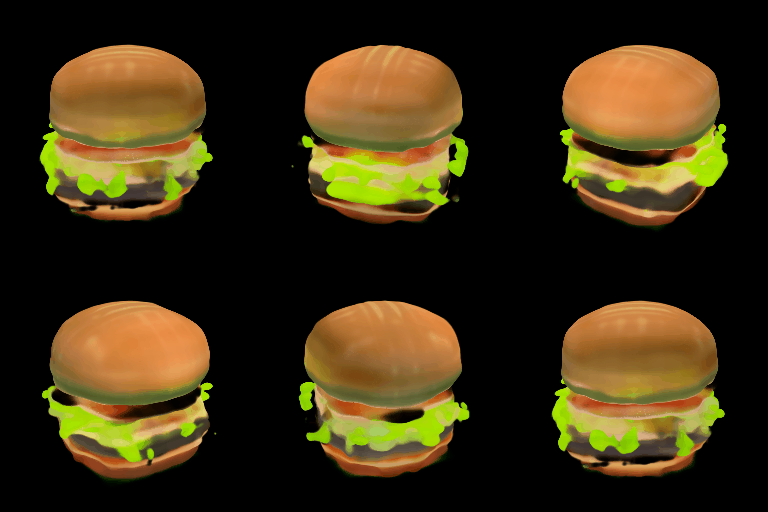
Pass the cheeseburger to the ShapEImg2ImgPipeline to generate a 3D representation of it.
from PIL import Image
from diffusers import ShapEImg2ImgPipeline
from diffusers.utils import export_to_gif

pipe = ShapEImg2ImgPipeline.from_pretrained("openai/shap-e-img2img", dtype=torch.float16, variant="fp16").to("cuda")  # or "mps", "xpu", "cpu"

guidance_scale = 3.0
image = Image.open("burger.png").resize((256, 256))

images = pipe(
    image,
    guidance_scale=guidance_scale,
    num_inference_steps=64,
    frame_size=256,
).images

gif_path = export_to_gif(images[0], "burger_3d.gif")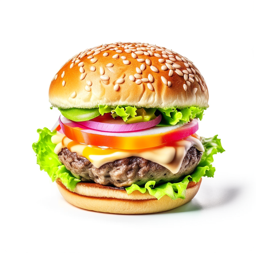
Generate mesh
Shap-E is a flexible model that can also generate textured mesh outputs to be rendered for downstream applications. In this example, you’ll convert the output into a glb file because the 🤗 Datasets library supports mesh visualization of glb files which can be rendered by the Dataset viewer.
You can generate mesh outputs for both the ShapEPipeline and ShapEImg2ImgPipeline by specifying the output_type parameter as "mesh":
import torch
from diffusers import ShapEPipeline

device = torch.device("cuda" if torch.cuda.is_available() else "cpu")

pipe = ShapEPipeline.from_pretrained("openai/shap-e", dtype=torch.float16, variant="fp16")
pipe = pipe.to(device)

guidance_scale = 15.0
prompt = "A birthday cupcake"

images = pipe(prompt, guidance_scale=guidance_scale, num_inference_steps=64, frame_size=256, output_type="mesh").images
Use the export_to_ply() function to save the mesh output as a ply file:
You can optionally save the mesh output as an
objfile with theexport_to_obj()function. The ability to save the mesh output in a variety of formats makes it more flexible for downstream usage!
from diffusers.utils import export_to_ply

ply_path = export_to_ply(images[0], "3d_cake.ply")
print(f"Saved to folder: {ply_path}")
Then you can convert the ply file to a glb file with the trimesh library:
import trimesh

mesh = trimesh.load("3d_cake.ply")
mesh_export = mesh.export("3d_cake.glb", file_type="glb")
By default, the mesh output is focused from the bottom viewpoint but you can change the default viewpoint by applying a rotation transform:
import trimesh
import numpy as np

mesh = trimesh.load("3d_cake.ply")
rot = trimesh.transformations.rotation_matrix(-np.pi / 2, [1, 0, 0])
mesh = mesh.apply_transform(rot)
mesh_export = mesh.export("3d_cake.glb", file_type="glb")
Upload the mesh file to your dataset repository to visualize it with the Dataset viewer!

ShapEPipeline
class diffusers.ShapEPipeline
< source >( prior: PriorTransformertext_encoder: CLIPTextModelWithProjectiontokenizer: CLIPTokenizerscheduler: HeunDiscreteSchedulershap_e_renderer: ShapERenderer )
Parameters
- prior (PriorTransformer) — The canonical unCLIP prior to approximate the image embedding from the text embedding.
- text_encoder (CLIPTextModelWithProjection) — Frozen text-encoder.
- tokenizer (CLIPTokenizer) —
A
CLIPTokenizerto tokenize text. - scheduler (HeunDiscreteScheduler) —
A scheduler to be used in combination with the
priormodel to generate image embedding. - shap_e_renderer (
ShapERenderer) — Shap-E renderer projects the generated latents into parameters of a MLP to create 3D objects with the NeRF rendering method.
Pipeline for generating latent representation of a 3D asset and rendering with the NeRF method.
This model inherits from DiffusionPipeline. Check the superclass documentation for the generic methods implemented for all pipelines (downloading, saving, running on a particular device, etc.).
__call__
< source >( prompt: strnum_images_per_prompt: int = 1num_inference_steps: int = 25generator: typing.Union[torch.Generator, list[torch.Generator], NoneType] = Nonelatents: typing.Optional[torch.Tensor] = Noneguidance_scale: float = 4.0frame_size: int = 64output_type: str | None = 'pil'return_dict: bool = True ) → ShapEPipelineOutput or tuple
Parameters
- prompt (
strorlist[str]) — The prompt or prompts to guide the image generation. - num_images_per_prompt (
int, optional, defaults to 1) — The number of images to generate per prompt. - num_inference_steps (
int, optional, defaults to 25) — The number of denoising steps. More denoising steps usually lead to a higher quality image at the expense of slower inference. - generator (
torch.Generatororlist[torch.Generator], optional) — Atorch.Generatorto make generation deterministic. - latents (
torch.Tensor, optional) — Pre-generated noisy latents sampled from a Gaussian distribution, to be used as inputs for image generation. Can be used to tweak the same generation with different prompts. If not provided, a latents tensor is generated by sampling using the supplied randomgenerator. - guidance_scale (
float, optional, defaults to 4.0) — A higher guidance scale value encourages the model to generate images closely linked to the textpromptat the expense of lower image quality. Guidance scale is enabled whenguidance_scale > 1. - frame_size (
int, optional, default to 64) — The width and height of each image frame of the generated 3D output. - output_type (
str, optional, defaults to"pil") — The output format of the generated image. Choose between"pil"(PIL.Image.Image),"np"(np.array),"latent"(torch.Tensor), or mesh (MeshDecoderOutput). - return_dict (
bool, optional, defaults toTrue) — Whether or not to return a ShapEPipelineOutput instead of a plain tuple.
Returns
ShapEPipelineOutput or tuple
If return_dict is True, ShapEPipelineOutput is returned,
otherwise a tuple is returned where the first element is a list with the generated images.
The call function to the pipeline for generation.
Examples:
>>> import torch
>>> from diffusers import DiffusionPipeline
>>> from diffusers.utils import export_to_gif

>>> device = torch.device("cuda" if torch.cuda.is_available() else "cpu")

>>> repo = "openai/shap-e"
>>> pipe = DiffusionPipeline.from_pretrained(repo, torch_dtype=torch.float16)
>>> pipe = pipe.to(device)

>>> guidance_scale = 15.0
>>> prompt = "a shark"

>>> images = pipe(
...     prompt,
...     guidance_scale=guidance_scale,
...     num_inference_steps=64,
...     frame_size=256,
... ).images

>>> gif_path = export_to_gif(images[0], "shark_3d.gif")
ShapEImg2ImgPipeline
class diffusers.ShapEImg2ImgPipeline
< source >( prior: PriorTransformerimage_encoder: CLIPVisionModelimage_processor: CLIPImageProcessorPilscheduler: HeunDiscreteSchedulershap_e_renderer: ShapERenderer )
Parameters
- prior (PriorTransformer) — The canonical unCLIP prior to approximate the image embedding from the text embedding.
- image_encoder (CLIPVisionModel) — Frozen image-encoder.
- image_processor (CLIPImageProcessor) —
A
CLIPImageProcessorto process images. - scheduler (HeunDiscreteScheduler) —
A scheduler to be used in combination with the
priormodel to generate image embedding. - shap_e_renderer (
ShapERenderer) — Shap-E renderer projects the generated latents into parameters of a MLP to create 3D objects with the NeRF rendering method.
Pipeline for generating latent representation of a 3D asset and rendering with the NeRF method from an image.
This model inherits from DiffusionPipeline. Check the superclass documentation for the generic methods implemented for all pipelines (downloading, saving, running on a particular device, etc.).
__call__
< source >( image: PIL.Image.Image | list[PIL.Image.Image]num_images_per_prompt: int = 1num_inference_steps: int = 25generator: typing.Union[torch.Generator, list[torch.Generator], NoneType] = Nonelatents: typing.Optional[torch.Tensor] = Noneguidance_scale: float = 4.0frame_size: int = 64output_type: str | None = 'pil'return_dict: bool = True ) → ShapEPipelineOutput or tuple
Parameters
- image (
torch.Tensor,PIL.Image.Image,np.ndarray,list[torch.Tensor],list[PIL.Image.Image], orlist[np.ndarray]) —Imageor tensor representing an image batch to be used as the starting point. Can also accept image latents as image, but if passing latents directly it is not encoded again. - num_images_per_prompt (
int, optional, defaults to 1) — The number of images to generate per prompt. - num_inference_steps (
int, optional, defaults to 25) — The number of denoising steps. More denoising steps usually lead to a higher quality image at the expense of slower inference. - generator (
torch.Generatororlist[torch.Generator], optional) — Atorch.Generatorto make generation deterministic. - latents (
torch.Tensor, optional) — Pre-generated noisy latents sampled from a Gaussian distribution, to be used as inputs for image generation. Can be used to tweak the same generation with different prompts. If not provided, a latents tensor is generated by sampling using the supplied randomgenerator. - guidance_scale (
float, optional, defaults to 4.0) — A higher guidance scale value encourages the model to generate images closely linked to the textpromptat the expense of lower image quality. Guidance scale is enabled whenguidance_scale > 1. - frame_size (
int, optional, default to 64) — The width and height of each image frame of the generated 3D output. - output_type (
str, optional, defaults to"pil") — The output format of the generated image. Choose between"pil"(PIL.Image.Image),"np"(np.array),"latent"(torch.Tensor), or mesh (MeshDecoderOutput). - return_dict (
bool, optional, defaults toTrue) — Whether or not to return a ShapEPipelineOutput instead of a plain tuple.
Returns
ShapEPipelineOutput or tuple
If return_dict is True, ShapEPipelineOutput is returned,
otherwise a tuple is returned where the first element is a list with the generated images.
The call function to the pipeline for generation.
Examples:
>>> from PIL import Image
>>> import torch
>>> from diffusers import DiffusionPipeline
>>> from diffusers.utils import export_to_gif, load_image

>>> device = torch.device("cuda" if torch.cuda.is_available() else "cpu")

>>> repo = "openai/shap-e-img2img"
>>> pipe = DiffusionPipeline.from_pretrained(repo, torch_dtype=torch.float16)
>>> pipe = pipe.to(device)

>>> guidance_scale = 3.0
>>> image_url = "https://hf.co/datasets/diffusers/docs-images/resolve/main/shap-e/corgi.png"
>>> image = load_image(image_url).convert("RGB")

>>> images = pipe(
...     image,
...     guidance_scale=guidance_scale,
...     num_inference_steps=64,
...     frame_size=256,
... ).images

>>> gif_path = export_to_gif(images[0], "corgi_3d.gif")
ShapEPipelineOutput
class diffusers.pipelines.shap_e.pipeline_shap_e.ShapEPipelineOutput
< source >( images: list[list[PIL.Image.Image]] | list[list[numpy.ndarray]] )
Output class for ShapEPipeline and ShapEImg2ImgPipeline.